
FAQ
arrow_back_ios
We stop accepting reservations for tomorrow at exactly 5:00 PM. How can we configure this?
You can achieve this setup by using dynamic time boundaries. At 17:00, the start time should be shifted to the day after tomorrow. Let's calculate how many hours you need to shift the start time:
(24 - 17) + 24 = 7 + 24 = 31.
Now, let's configure this for hourly rentals.
Open the rule settings. Set the Shift the start from the current time parameter to 31 h. Then, under Round down?, select To the beginning of the day. Save your changes.
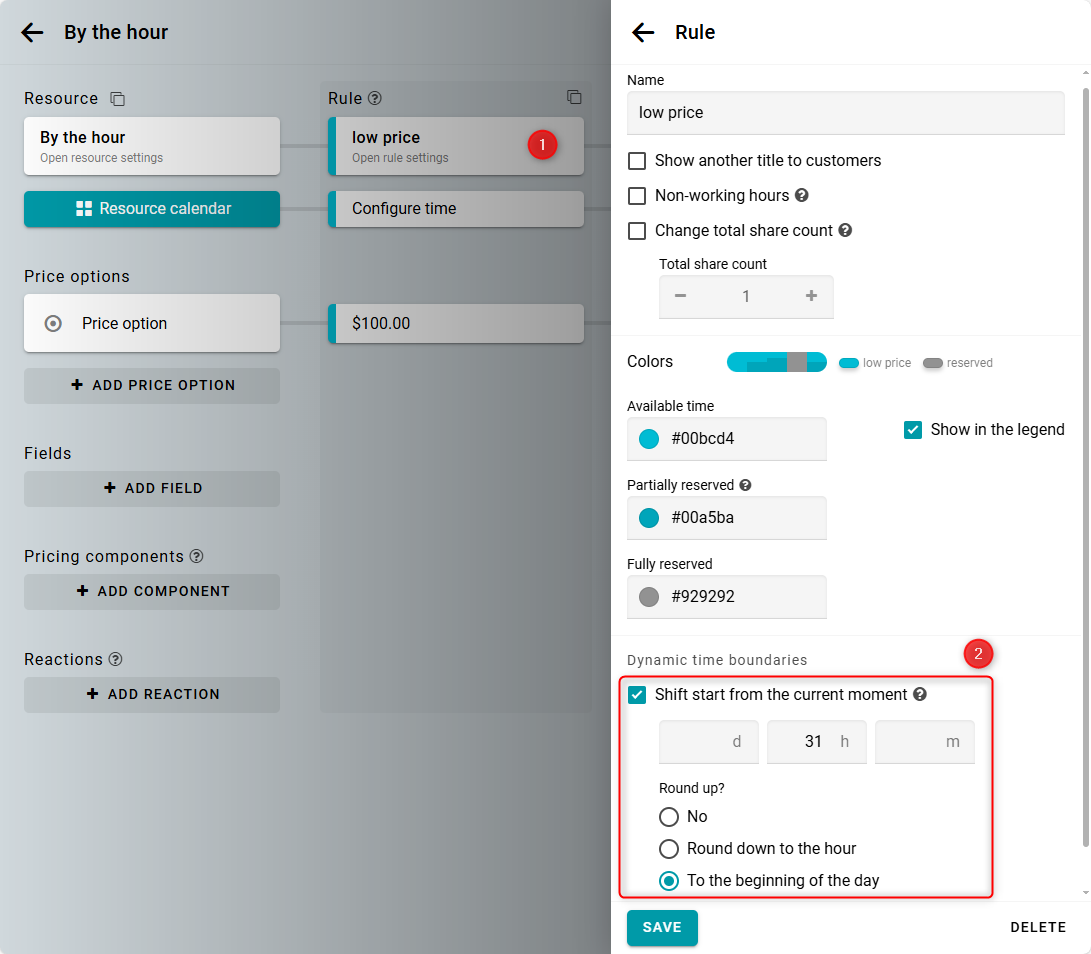
Now, at 16:00, the time will first shift to 23:00 tomorrow and then round down to the beginning of tomorrow, so tomorrow can still be booked.
And at 18:00, the time will first shift to 1:00 the day after tomorrow and then round down to the beginning of the day after tomorrow, so bookings for tomorrow are closed.